
One configuration model for 9,000+ tax agencies
Asure Compliance Engine: UX Case Study
Brought onsite to redesign screens, I found that no one had ever mapped how the compliance engine's entities depended on each other. I built that map first, then designed the state machine and configuration patterns on top of it.
- Role
- UX Designer, sole designer embedded onsite from discovery through delivery
- Timeline
- Onsite engagement, Dallas TX
- Tools
- Figma, Whiteboarding, Miro, Jira
- tax agencies configured through one model
- 9,000+
- revision states kept distinct, so no change reaches a live filing silently
- 4
- configuration errors after launch, observed by the team, not baselined
- Fewer
At a glance
- Problem
- Legacy screens exposed the database, and nobody had mapped how the compliance entities depended on each other.
- Solution
- One configuration model with a visible draft, review, locked and released lifecycle, and the impact of a change shown before it saves.
- Outcome
- No silent changes to live rules and an audit-ready revision history; fewer configuration errors observed after launch, not baselined.
Recreated with sample data to show the design decisions. Not Asure's production UI.
Context
An engine hidden behind legacy abstraction
Asure's payroll compliance engine sits underneath payroll processing for thousands of employers across the US and Canada. Every state, province, and locality has its own rules, and misconfiguring any one of them doesn't produce a bug. It produces a failed tax filing or a regulatory penalty.
- 01
Tax Code
- 02
Payee
- 03
Formula
- 04
Filing Frequency
- 05
Holiday Calendar
- 06
Revision & Release
The Problem
The brief was to redesign screens. The real problem was elsewhere.
Once I was onsite, we quickly realized that nobody (not engineering, not the SME team, not product) had a complete map of how the entities related to each other. Everyone held a partial model. Engineers understood the data layer. SMEs understood the regulatory logic. But the dependency chain connecting a tax code to a formula to a filing frequency to a payee to a holiday calendar had never been drawn end-to-end.
That was the real problem. Not the screens. The absence of a shared mental model, and a product that had been built on top of that absence for years. So we got together and built that map first.
- Backend Logic Exposed
- Database-level relationships surfaced in the UI with no conceptual scaffolding. Users had to understand the system model just to complete basic tasks.
- Implicit State Changes
- Saving a configuration could silently alter downstream compliance behavior. Users had no visibility into what changed or what it affected.
- Invisible Entity Relationships
- Tax codes, formulas, filing frequencies, and payees were interdependent, but visually disconnected. Edits cascaded in unexpected ways.
- Revision Rules Not Intuitive
- When a config should be locked, released, or versioned was undocumented and opaque, creating compliance drift risk.
- Confusing Threshold Triggers
- Threshold-based behavioral changes, where one value unlocks or restricts another, were entirely hidden from the user.
- No Scalability Pattern
- 9,000+ tax agencies with no consistent interaction model. Every configuration felt bespoke and fragile.
What each audience needed
- Payroll Admins
- Determinism: predictable, safe, explicit configuration flows
- SMEs
- Compliance rigor: no way to accidentally violate regulatory rules
- Engineering
- Clear state definitions: UI that maps to the actual backend model
My Role
Embedded, cross-functional, onsite in Dallas.
My most significant contribution wasn't a deliverable. It was forcing a conversation that hadn't happened yet.
When I mapped the entity dependency chain on a whiteboard (tax code to formula to filing frequency to payee to holiday calendar) the room got quiet. Engineers recognized the data relationships. SMEs recognized the compliance logic. Neither group had seen both layers mapped together before. That diagram became the foundation for everything that followed.
I also pushed hard for one decision that engineering initially resisted: draft, in-review, locked and released configurations had to stay visibly distinct, and the interface could never confirm a transition the system hadn't made. No optimistic UI that hid whether a change was live. For a compliance product, that is a correctness requirement, not a UX preference.
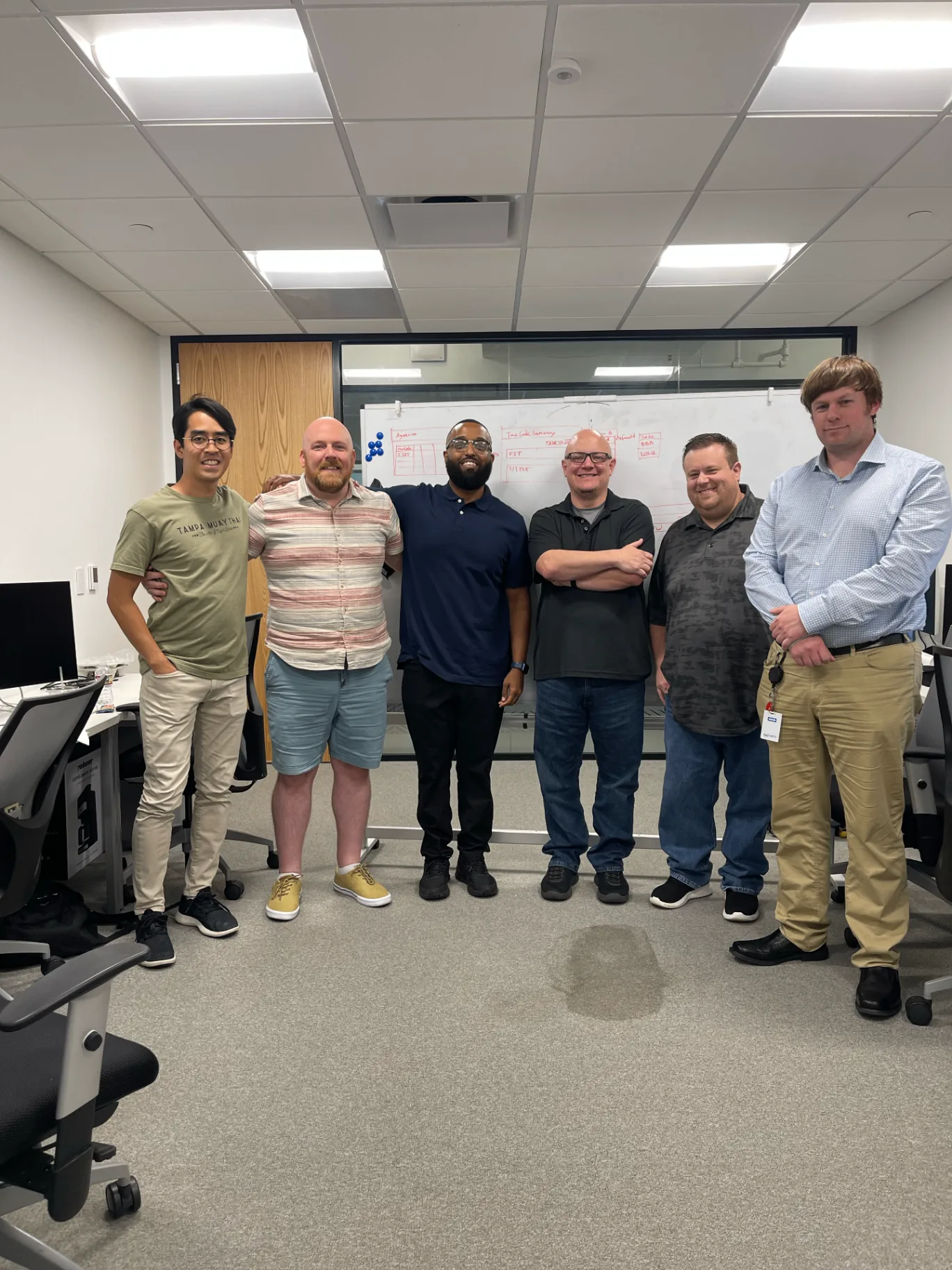
Onsite in Dallas, collaborating with engineering and compliance SMEs
Spent multiple days onsite in Dallas collaborating with engineering, PM, and SMEs
Facilitated whiteboarding sessions to map entity relationships and dependency chains
Redefined configuration flows to reflect real compliance mental models
Influenced how state transitions were surfaced and communicated in the UI
Designed revision lifecycle behavior: draft, lock, release, version
Created wireframes and interactive prototypes to align all three stakeholder groups
Decisions
Four changes that made configuration predictable
Each contribution addressed a distinct failure mode in the legacy system, and together they formed a coherent, scalable configuration platform.
Entity Relationship Clarity
Parent-child hierarchy surfaced in navigation and forms, so a payroll admin editing a formula understands what downstream tax codes and filing frequencies are affected.
Before
- Entities visually disconnected
- Hidden downstream dependencies
- No parent-child hierarchy visible
- Silent cascading on edit
After
- Clarified parent-child hierarchy
- Navigation mirrors entity model
- Surfaced downstream impact
- Reduced hidden dependencies
State-Driven Revision Lifecycle
Explicit state. No silent changes. No compliance drift.
Before
- No visible draft vs. live distinction
- Changes could silently affect live filing
- No audit trail for revisions
- Locking behavior undocumented
After
- Draft → Review → Locked → Released
- Explicit release triggers
- Historical version access
- Audit visibility throughout
Revision Lifecycle State Machine
Draft
Editable
In Review
SME sign-off
Locked
Immutable
Released
Live / versioned
- Lock prevents all edits until explicitly unlocked
- Release creates an immutable version snapshot
- Rollback is available to any prior released state
- The audit log captures every state transition
Dynamic Validation & Threshold Modeling
Making threshold logic legible, not surprising
Before
- Threshold triggers implicit and invisible
- No field-level validation feedback
- Jurisdiction rules not surfaced
- Users guessed at required values
After
- Conditional field visibility
- Threshold warnings before errors
- Hard stops with clear rationale
- Jurisdiction-specific validation rules
Validation rules
- Warning
Rate > jurisdiction threshold
Additional rate fields revealed
- Conditional
Filing frequency = quarterly
Annual limit field required
- Standard
Payee type = electronic
Routing + account fields visible
- Conditional
Multi-state employer flag
Reciprocity field required
- Hard Stop
Missing required jurisdiction field
Save blocked, inline guidance shown
- Warning
Holiday falls on filing date
Auto-adjusted date surfaced for review
Condition Field behavior Type Rate > jurisdiction threshold Additional rate fields revealed Warning Filing frequency = quarterly Annual limit field required Conditional Payee type = electronic Routing + account fields visible Standard Multi-state employer flag Reciprocity field required Conditional Missing required jurisdiction field Save blocked, inline guidance shown Hard Stop Holiday falls on filing date Auto-adjusted date surfaced for review Warning Scalable CRUD for 9,000+ Tax Agencies
Usability at a scale that breaks default patterns
Before
- Flat, unsortable tax code lists
- No structured search or filtering
- Linking across entities was manual
- Accidental misconfiguration risk
After
- Multi-dimension filterable tables
- Structured search with clear scope
- Deterministic entity linking
- Dependency warnings on destructive actions
Before & After
Editing a tax rate, before and after
The same task on the legacy screen and on the redesign. Three changes did most of the work.
Before · legacy, recreated
After · shipped design, recreated
One status became four. The old form had a single Active status, so nobody could tell whether an edit was already live. Draft, in review, locked and released are now always visible.
Impact before saving. The old form showed database IDs. The new one shows which employers, filing frequencies and payees a change reaches before anyone saves it.
Save stopped meaning live. Saving used to change production. Now it creates a draft, and release is a separate, logged step.
Both screens recreated from memory as wireframes with sample values. Not Asure's production UI.
Designing for Intuition
Translating regulatory logic into human mental models
The differentiator wasn't the UI patterns. It was the translation layer. Turning compliance logic into something a payroll admin can confidently configure without a tax law degree.
- Step-Based Workflows
- Complex configurations broken into ordered, completable steps. Progress made visible.
- Predictable Patterns
- Consistent interaction models across all entity types. Learn once, apply across 9,000+ tax agencies.
- Clear Status Indicators
- Every record communicates its state immediately: draft, locked, released, error.
- Visual Hierarchy for Decisions
- Critical fields up front, advanced settings revealed progressively.
- Progressive Disclosure
- Advanced jurisdiction-specific settings hidden by default. Surfaced only when relevant.
- Consistent CRUD Patterns
- Create, edit, delete, and link interactions followed identical models regardless of entity type.
Legacy to redesign
- Raw database relationships
- Structured entity hierarchy
- Implicit state changes
- Explicit state machine
- Hidden threshold logic
- Surfaced validation logic
- Disconnected entity forms
- Unified configuration flows
- No revision visibility
- Audit-ready revision lifecycle
- Flat unstructured tables
- Filterable, searchable tables
Interactive Prototype
Change a rate, the way an admin would
A recreation of the configuration workflow, built to show the four decisions above working together. Try it in this order:
- The tree is the entity model: agency, tax code, then its formula, filing frequencies, payee and holiday calendar.
- On CA-SDI, change the rate. Past 25% from the released value you get a warning to confirm; past the jurisdiction maximum, a hard stop with the rule.
- Save the draft and read the impact before it saves, then take it through review, lock and release. Every step lands in History.
Recreated with sample data to show the design decisions. Agencies are real jurisdictions; rates, counts and people are not. Not Asure's production UI.
Collaboration
Three disciplines. One shared mental model.
The sharpest moment came when we got to revision and release. Engineers had a precise technical definition of "released": a record flag, a database state. SMEs had a compliance definition: a configuration that had been reviewed, approved, and is now legally in effect. These weren't the same thing, and for years the product had quietly conflated them.
The state machine we landed on wasn't just a UX pattern. It was a negotiated definition, a shared contract between what the system does and what the business means. That conversation couldn't have happened in a ticket or a Slack thread. It happened on a whiteboard in Dallas with both sides in the room.
Engineers
- Validated technical feasibility of state models
- Informed data architecture constraints
- Confirmed which relationships were database-enforced
- Aligned on API-level state transitions
Subject Matter Experts
- Validated compliance accuracy of flows
- Confirmed threshold trigger logic
- Reviewed jurisdiction-specific edge cases
- Approved revision lifecycle model
Product Managers
- Aligned design scope with roadmap priorities
- Triaged which entity types to tackle first
- Managed stakeholder expectations on phasing
- Bridged business requirements to design intent
Outcome
No silent changes, and an audit-ready lifecycle
After launch the team observed fewer configuration errors and faster onboarding for new tax agencies. Those are observations rather than baselined measurements; what the redesign demonstrably changed is below.
- Prevented Silent State Changes
- Explicit state machine eliminated a class of errors where configuration edits cascaded invisibly into live payroll filings, protecting compliance for thousands of active employers.
- Clarified Entity Relationships
- Parent-child hierarchy made visible in navigation and forms, reducing misconfiguration from disconnected entity editing.
- Reduced Configuration Ambiguity
- Structured step-based workflows gave payroll admins a clear path through every configuration. No more guessing, no more silent errors.
- Improved Audit Transparency
- Every state change is now traceable with a full revision history, a non-negotiable requirement for regulatory compliance audits.
- Aligned UX with Backend State Model
- The revision states the UI shows (draft, in review, locked, released) correspond exactly to the system's, reducing implementation ambiguity and keeping the product from diverging from the system again.
- Structured Scalable Architecture
- Consistent interaction patterns across all 9,000+ tax agencies mean new jurisdictions can be onboarded without a redesign.
What I Learned
The biggest deliverable was a conversation
The most impactful design work often isn't a deliverable. It's forcing a conversation that hasn't happened yet. Mapping the entity dependency chain on a whiteboard created more alignment than any prototype.
In a compliance workflow, draft, approved and in-effect configurations must always be distinguishable, and the interface must never confirm a state change that hasn't happened. That is a correctness requirement. It doesn't mean every database state belongs on screen.
Next project
OneAsure PortalHiring for a senior UX role?